
Paint Lab

Role
UI Designer, UX Researcher
Users
Hobbyist painters, model makers, creative beginners
Timeline
3 Weeks
Tools
Figma, Lovable, OpenAI, Community research, Informal interviews
(01) Overview
Context & Motivation
Hobbyist painters and scale model builders—such as Gunpla enthusiasts, military modelers, and beginners—often struggle to mix paints to achieve specific colors. Working in casual setups with limited time, materials, and experience, they lack the structure and precision available to professionals.
Most digital color tools cater to professional workflows, relying on color theory, exact ratios, or standardized systems that don’t translate well to physical hobby paints. As a result, hobbyists depend on trial and error, repeatedly remixing and wasting paint when colors miss the mark.
This self-initiated UX case study explores how an early AI-generated concept can be refined through research and human-centered design to better match how hobbyists actually think, mix, and experiment—prioritizing usability over perfect simulation.
Problem
Hobbyists struggle to predict paint mixes because existing tools ignore real-world paint behavior, brand differences, and informal workflows. This leads to wasted materials, frustration, and low confidence in creating custom colors.
Solution
A mobile-first paint-mixing app that emphasizes visual exploration and experimentation. Using drop-based inputs, instant visual feedback, and the ability to save mixes, it lets users experiment freely without needing technical color knowledge.
(02) Initial Hypothesis & Assumptions
Understanding the Problem Space
As a Gunpla hobbyist, I often mix a limited set of paints to create complex, multi-tone colors. Recreating a shade weeks later usually requires trial and error, which leads to wasted paint and frustration. I hypothesized that other hobbyists face the same challenge and could benefit from an app that suggests mixes based on target colors, helping users plan and experiment without relying solely on memory or guesswork.
To explore this idea quickly, I used AI to generate early interface concepts and simulate color-mixing workflows. This approach allowed me to visualize features like adjusting ratios and previewing results without committing to detailed design work. At this stage, AI acted as a rapid ideation partner, helping refine concepts and inform the next steps in human-centered design.

Validating Beyond Personal Experience
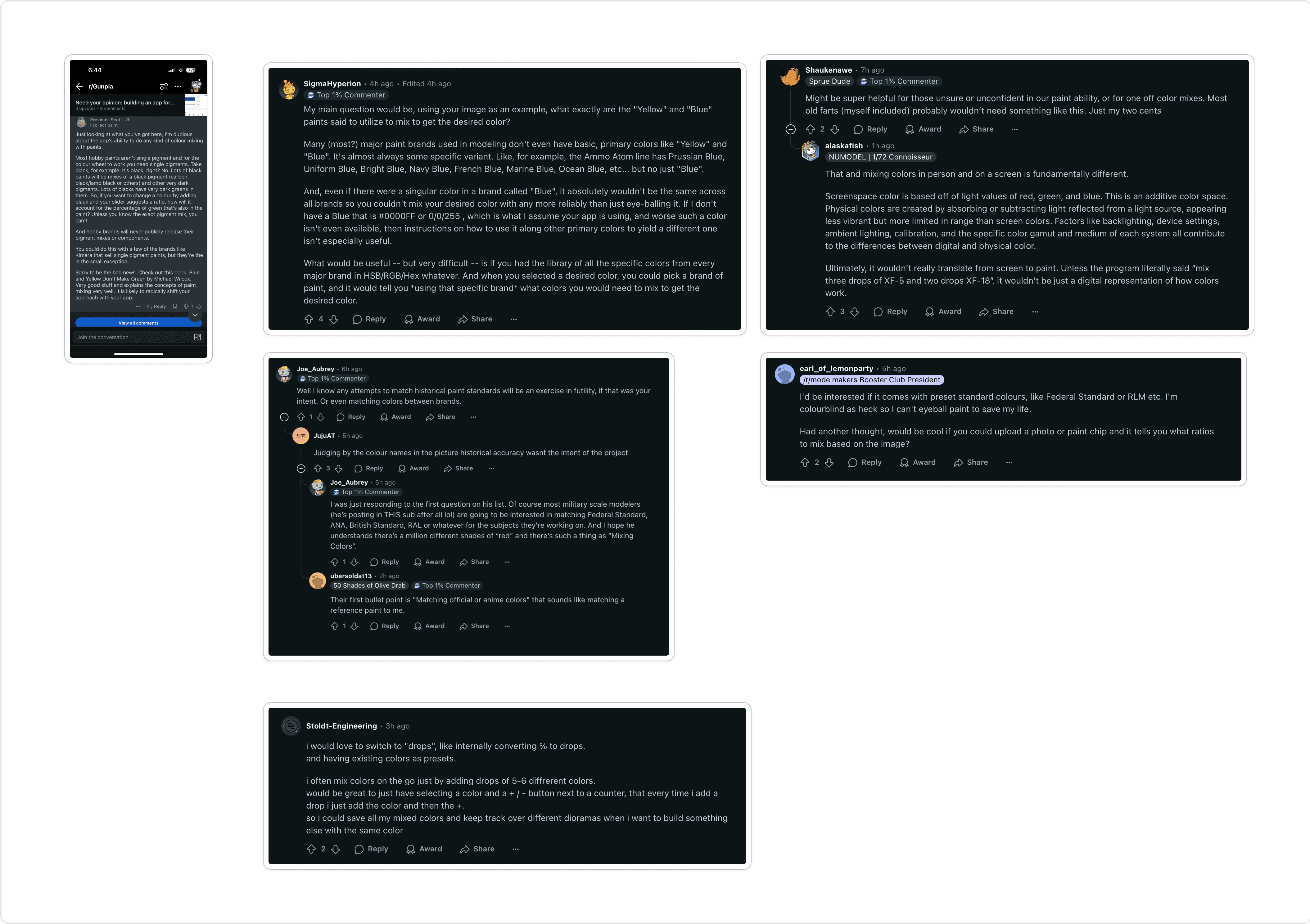
To avoid designing just for myself, I tested the concept with the broader hobbyist community. I shared the AI-generated prototype on Reddit (Gunpla and scale modeling subreddits), conducted informal interviews, and observed painters at meetups—focusing on how they mixed colors and documented results.
I also spoke with military modelers and miniature painters. Despite different subjects, their workflows were similar: most mixed paints visually, relied on intuition, and accepted some inconsistency.
The feedback challenged my assumptions:
Many hobbyists already had large paint collections, lowering the value of ratio-based suggestions.
Users doubted a digital tool could accurately reflect real paint behavior.
Few measured paint precisely; most mixed by drops, brush loads, or visual comparison.
These insights shifted the focus from formulas to supporting confidence and repeatable results.
(03) Key Insights & Problem Reframing


What the Research Revealed
Across interviews, community discussions, and observations, paint mixing for hobbyists was rarely systematic. Most users mix colors incrementally, adjusting until the result “looks right,” with visual judgment taking priority over precision.
Paint waste was a common frustration. Hobbyists often discard mixes that miss the mark, and successful mixes are frequently forgotten or impossible to recreate because they were never documented.
Brand differences and accessibility further complicate the process. Colors vary between brands, and digital tools cannot perfectly replicate physical pigments. Beginners especially valued plain-language color names, intuitive controls, and visual references, while optional features like brand palettes or reference photos were seen as helpful but nonessential.
Reframing the Core Problem
These findings reframed the problem statement:
Assumptions vs. Reality
Initial assumptions
Users want precise ratios and measurements
Digital accuracy is the primary value
Primary colors are universal
Digital mixes should closely match real paint
Real-world insights
Users mix by drops and visual adjustment
Confidence and visual reference matter more than precision
Colors vary widely by brand and pigment
Users accept approximation as a starting point
(04) Defining the MVP
Research made it clear that an effective MVP should prioritize confidence, speed, and usability over technical precision. The app needed to feel like a companion to the painting process, not a scientific instrument.
What the Research Revealed
Features were evaluated based on two criteria: user impact and implementation effort. High-impact, low-to-medium effort features were prioritized, while high-effort or data-dependent features were deferred.
The MVP includes:
Drop-based mixing inputs that mirror real-world behavior
Real-time visual previews
A generic primary color palette
The ability to save and name custom mixes
Deferred or excluded features include brand-specific paint libraries, exact ratio calculations, social sharing, and advanced color matching. Limiting scope ensured clarity of purpose and feasibility.
Feature
User Impact
Effort
Decision
Drop-based mixing input
High
Low
✅ MVP
Real-time color preview
High
Medium
✅ MVP
Generic color palette
Medium-High
Low
✅ MVP
Save and name mixes
Medium-High
Low
✅ MVP
Brand-specific paint selection
High
High
❌ Deferred (future)
Exact ratio calculations
Low
High
❌ Excluded
Paint chip-upload
Medium
High
❌ Deferred (future)
Social / sharing features
Low
High
❌ Excluded
(05) UX Design & Execution
Using AI for Rapid Exploration
Features were evaluated based on two criteria: user impact and implementation effort. High-impact, low-to-medium effort features were prioritized, while high-effort or data-dependent features were deferred.

Translating Insights into Figma
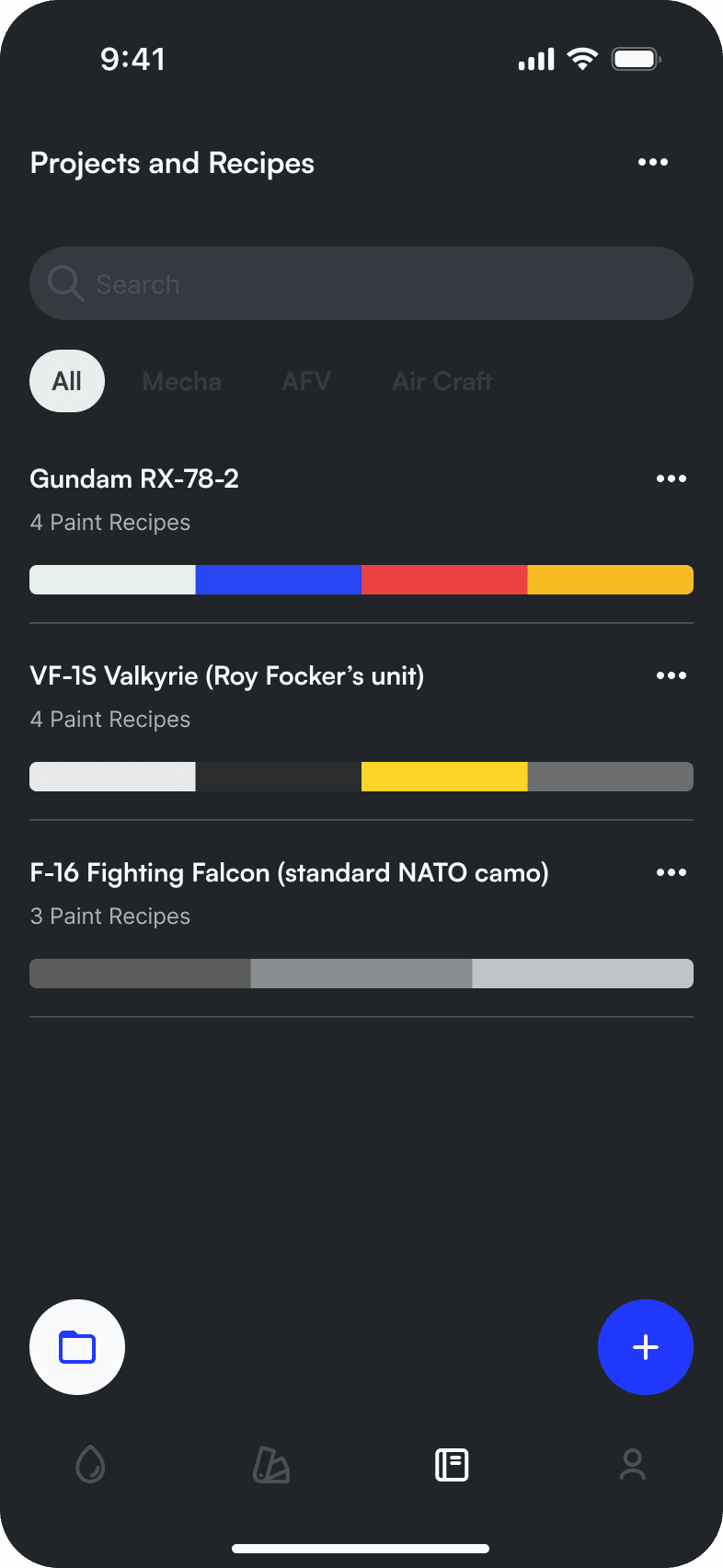
Research showed that hobbyists often reference their phones mid-session, making mobile-first design essential. Rebuilding the interface in Figma allowed full control over layout, spacing, and interaction flow.
Key design decisions included:
A compact single-screen layout to reduce navigation
Reachable controls for one-handed use
Continuous visual feedback during adjustments
Simplified hierarchy to reduce cognitive load




Chaos in a glance
Through this redesign, the concept evolved from an abstract AI-generated idea into a usable, research-informed interface aligned with real workflows.
(06) Testing and Insights
Prototype Testing
The clickable Figma prototype was tested with hobbyists who interacted with it as they would during real paint mixing. Even without instructions, users quickly understood the interface and were able to experiment, adjust colors, and save mixes.
Key Learnings
This project reinforced several lessons:
Early research prevents overdesigning for edge cases
AI accelerates ideation but cannot replace human judgment
Simplicity and alignment with real behavior matter more than technical sophistication
Next Steps
Future iterations could explore photo-based color input, expanded paint libraries, and deeper brand collaboration. Further testing would validate which features genuinely improve confidence without increasing complexity.
Conclusion
By starting with a personal pain point and grounding the solution in real user behavior, this project demonstrates how AI-generated concepts can be refined into practical, human-centered products. The result is not a perfect simulation of paint mixing, but a tool that helps hobbyists experiment with confidence—meeting them where they are, not where tools assume they should be.